



Control Charts Explained: How to Use X-bar R Chart for Process Monitoring [2026]

In this guide, I will walk you through control charts X-bar R chart process monitoring explained in a simple and practical way, just like I train quality engineers and auditors in real projects. 

Over the years, I’ve seen that many teams collect data but fail to use it for decision-making, which is where control charts truly shine. 

When used correctly, these charts help you identify process variation, instability, and hidden issues before they become serious problems. 

In manufacturing and service industries, studies show that organizations using proper statistical process control charts reduce defects by up to 30–50%.

control-charts-X-bar-R-chart-process-monitoring-explained

Contents

What Are Control Charts and Why They Matter in Quality Management?

As a Quality Manager and Certified Auditor, I always tell teams that control charts are not just graphs—they are decision-making tools. A control chart helps you understand whether your process is stable or unstable over time. 

Instead of guessing, you rely on data to see if variation is normal or something unusual is happening. This is the foundation of process variation monitoring.

Control charts were first introduced by Walter A. Shewhart, and that’s why they are often called Shewhart control charts. These charts are widely used in industries like automotive, aerospace, healthcare, and electronics. 

In fact, according to industry benchmarks, companies using SPC charts manufacturing practices achieve significantly higher process consistency and audit compliance. I have personally seen audit findings drop when organizations implement these tools properly.

There are many QC control chart types, but not all are suitable for every situation. Some charts are used for attributes (like defects), while others are used for variables (like measurements). 

The X-bar R chart falls under variable data charts, making it ideal when you measure things like length, weight, or temperature. Choosing the right chart is the first step toward effective monitoring.

Recommended Reference Materials and Audit Resources:

For professionals wanting to perform stronger audits, these references are extremely useful:

I strongly recommend the official 7 Quality Tools for World class Problem Solving for auditors working in automotive supplier quality.

What Is an X-bar R Chart?

An X-bar R chart is a type of control chart used in statistical process control to monitor the mean (average) and range (variation) of a process over time. It helps identify whether a process is stable by comparing data points against calculated Upper Control Limit (UCL) and Lower Control Limit (LCL)

This chart is widely used in manufacturing and quality management to detect process variation and out-of-control conditions early.

Control Charts X-bar R Chart Process Monitoring Explained:

When I train engineers, I simplify the concept: the X-bar R chart is actually two charts in one. The X-bar chart tracks the average of samples, while the R chart tracks the variation within those samples. Together, they give a complete picture of your process stability. This is why it is one of the most powerful tools in process capability control chart analysis.

Let’s take a simple example from a machining process. Suppose you measure the diameter of a shaft every hour and take 5 samples each time. 

The X-bar chart will show whether the average diameter is shifting, while the R chart will show whether the variation within each group is increasing. If either goes out of control, it signals a problem that needs attention.

In real audits, I often see companies using only averages and ignoring variation. This is a mistake because a process can have a stable average but high variation, which leads to defects. 

The combination of X-bar and R charts ensures that both aspects are monitored. This approach is essential for strong control chart interpretation.

Key Components of an X-bar R Chart:

Understanding the components of the chart is very important before you start using it. Every X-bar R chart consists of three main lines: the Center Line (CL), Upper Control Limit (UCL), and Lower Control Limit (LCL). These are calculated using statistical formulas and represent the expected variation in the process. This is where UCL LCL calculation becomes critical.

The center line represents the average of all sample averages, while the control limits define the acceptable range of variation. If your data points stay within these limits, the process is considered stable. 

However, if points go outside or show unusual patterns, it indicates an out-of-control condition. In practice, about 99.73% of data points should fall within control limits if the process is stable.

Another important component is the subgroup or sample. Typically, subgroup sizes range from 2 to 10 samples, with 4 or 5 being the most common in manufacturing. 

Choosing the right subgroup size affects the sensitivity of the chart. I always recommend selecting a size that reflects real process conditions rather than convenience.

Types of Variation in Processes (Very Important Concept):

One of the most important lessons I teach during audits is understanding variation. Not all variation is bad. In fact, every process has some level of natural variation. The key is to distinguish between common cause variation and special cause variation.

Common cause variation is the natural fluctuation in a stable process. For example, slight differences in machine temperature or material properties. These variations are expected and do not require immediate action. In most processes, 85–95% of variation comes from common causes.

Special cause variation, on the other hand, indicates something unusual. This could be machine failure, operator error, or material defect. These are the variations you need to investigate immediately. The X-bar R chart helps you detect these signals quickly through control chart interpretation rules.

Recommended Reference Materials and Audit Resources:

For professionals wanting to perform stronger audits, these references are extremely useful:

I strongly recommend the official 7 Quality Tools for World class Problem Solving for auditors working in automotive supplier quality.

Western Electric Rules for Detecting Out-of-Control Conditions:

To make control charts more effective, we use Western Electric rules. These rules help identify patterns that indicate instability even if points are within control limits. In real-world audits, these rules are extremely useful for early detection.

Some commonly used rules include:

  • One point outside UCL or LCL
  • Two out of three consecutive points near control limits
  • A run of 7 or more points on one side of the center line
  • Continuous upward or downward trend

These patterns indicate that something is changing in the process. I always advise teams not to ignore these signals, as they often lead to major quality issues if left unchecked.

Why X-bar R Chart Is Widely Used in Manufacturing?

In my experience working with automotive and precision industries, the X-bar R chart is one of the most commonly used tools. It is simple, effective, and provides quick insights into process behavior. That’s why it is a core part of SPC charts manufacturing systems.

For example, in an automotive plant, monitoring the thickness of brake discs using X-bar R charts helps maintain consistency. Even a small deviation can affect safety and performance. Using these charts, companies can detect issues early and take corrective actions before defects occur.

Statistics show that companies using process capability control chart methods reduce rework costs by up to 25%. This is a huge benefit, especially in industries where quality failures can be expensive or dangerous.

X-bar R charts are essential tools in statistical process control that help organizations monitor both the average performance and variability of a process. By analyzing data over time and applying control limits, teams can quickly identify abnormal patterns and prevent defects.

These charts are widely used in manufacturing, quality audits, and process improvement initiatives. When combined with proper interpretation methods like Western Electric rules, they become highly effective for maintaining process stability and improving quality outcomes.

When Should You Use an X-bar R Chart?

Not every situation requires an X-bar R chart, and using the wrong chart can lead to incorrect conclusions. I always guide teams to use this chart when they have continuous data and can collect samples in subgroups. This includes measurements like length, weight, temperature, or pressure.

Here are some ideal use cases:

  • Machining processes (diameter, thickness)
  • Assembly line measurements
  • Packaging weight control
  • Temperature monitoring in processes

If your sample size is large (more than 10), then you should consider an X-bar S chart instead. Choosing the correct chart is a key step in effective process variation monitoring.

Real-Life Example: X-bar R Chart in Action

Let me share a simple real-world example. In a factory producing metal rods, the target diameter is 10 mm. Every hour, the operator measures 5 samples and records the values. These values are used to calculate the average and range.

Over time, the X-bar chart shows that the average is slowly increasing. At the same time, the R chart shows increasing variation. This indicates a potential issue, such as tool wear or machine misalignment. By acting early, the team avoids producing defective parts.

This is the real power of control charts X-bar R chart process monitoring explained—it helps you take action before problems escalate.

References and External Resources:

For deeper understanding and standards, you can refer to:

These are widely accepted sources used in audits and certifications.

Recommended Tools for Creating X-bar R Charts:

Here are some commonly used tools:

  • Microsoft Excel (SPC Templates)
  • Minitab (Industry Standard)
  • QI Macros for Excel
  • JMP Statistical Software

These tools make X-bar chart formula and R chart control limits calculations much easier and reduce manual errors.

How to Create an X-bar R Chart Step by Step (Practical Guide):

As a Quality Manager and QA/QC expert, I always emphasize one thing—don’t just understand control charts, practice them with real data. Creating an X-bar R chart is not complicated if you follow a structured approach. In fact, once you do it a few times, it becomes part of your daily process variation monitoring routine.

The first step is to collect data in subgroups. Typically, you take 4 to 5 samples per subgroup, and record data at regular intervals like hourly or per batch.

This subgrouping is important because it helps capture short-term variation, which is essential for accurate statistical process control charts. Without proper subgrouping, your analysis can become misleading.

Next, organize your data in a table format. Each row represents a subgroup, and each column contains individual measurements. From this, you will calculate the average (X-bar) and range (R) for each subgroup. This is the foundation for building both the X-bar chart and R chart control limits.

Step 1: Data Collection and Subgroup Formation

In real manufacturing environments, I always recommend collecting at least 20 to 25 subgroups before creating the chart. This ensures that your control limits are statistically reliable. 

Many teams make the mistake of using very little data, which leads to incorrect control chart interpretation.

For example, let’s say you are monitoring the diameter of a shaft. Every hour, you take 5 samples and record them. After 25 hours, you will have 25 subgroups, which is enough to calculate stable control limits. This approach is standard in SPC charts manufacturing practices.

Here’s a simple structure:

  • Subgroup 1: 10.01, 9.99, 10.02, 10.00, 10.01
  • Subgroup 2: 10.03, 10.01, 10.02, 10.04, 10.00
  • Continue for 25 subgroups

This type of structured data is critical for building a reliable process capability control chart.

Step 2: Calculate X-bar (Average) for Each Subgroup

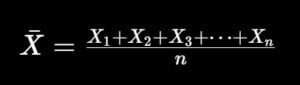
Now comes the first calculation. For each subgroup, you calculate the average using the X-bar chart formula. This gives you the central tendency of your process at each time interval.
Calculate-X-bar-Average-for-Each-Subgroup

In simple terms, you add all the values in a subgroup and divide by the number of samples. This gives you one average value per subgroup. Over time, these averages form the X-bar chart, which shows whether the process mean is stable.

For example, if your subgroup values are 10.01, 9.99, 10.02, 10.00, and 10.01, the average will be approximately 10.006. This value is plotted on the X-bar chart. Repeating this for all subgroups helps you track trends and shifts.

Step 3: Calculate Range (R) for Each Subgroup

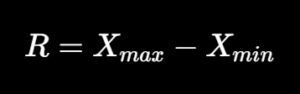
After calculating averages, the next step is to calculate the range (R). The range is simply the difference between the highest and lowest values in each subgroup. This helps you monitor variation within the process.
Calculate-Range-R-for-Each-Subgroup

For example, if your subgroup values range from 9.99 to 10.02, then the range is 0.03. This value is plotted on the R chart, which shows how much variation exists within each subgroup. Monitoring this is essential for detecting instability.

In my audits, I often find that teams ignore the R chart and focus only on averages. This is a mistake because variation is often the first signal of a problem, even before the average shifts.

Step 4: Calculate Overall Average and Average Range

Once you have all subgroup averages and ranges, you calculate:

  • Overall average of averages (X-double bar)
  • Average of ranges (R-bar)

These values become the center lines for your charts. They represent the expected performance of your process under stable conditions. This step is critical for accurate UCL LCL calculation.

For example:

  • X̄̄ (overall mean) = average of all subgroup averages
  • R̄ (average range) = average of all subgroup ranges

These values are used in the next step to calculate control limits.

Step 5: Calculate Control Limits (UCL and LCL)

This is where the real power of Shewhart control chart comes into play. Control limits define the expected range of variation in your process. If data points fall outside these limits, it indicates special cause variation.

X-bar Chart Control Limits:

X-bar-Chart-Control-Limits

R Chart Control Limits:

R-Chart-Control-Limits

The constants A2, D3, and D4 depend on your subgroup size. For example, if your subgroup size is 5:

  • A2 = 0.577
  • D3 = 0
  • D4 = 2.114

These constants are available in standard SPC tables and are widely used in SPC charts manufacturing environments.

Step 6: Plot the X-bar and R Charts

Once all calculations are done, the next step is plotting. You can do this using Excel or any statistical software. Plot subgroup numbers on the X-axis and calculated values on the Y-axis.

For the X-bar chart:

  • Plot subgroup averages
  • Draw center line (X̄̄)
  • Draw UCL and LCL

For the R chart:

  • Plot subgroup ranges
  • Draw center line (R̄)
  • Draw UCL and LCL

This visual representation makes it easy to perform control chart interpretation and identify trends.

Practical Example Using Excel (Real Scenario):

In one of my projects, we monitored the weight of packaged products using Excel. We collected 25 subgroups with 5 samples each. Using formulas, we calculated averages and ranges.

Then we used Excel charts to plot both X-bar and R charts. Within a few hours, we identified a shift in the process caused by machine calibration drift. Without the chart, this issue would have gone unnoticed for days.

This is why I always recommend using tools like:

  • Excel with SPC templates
  • Minitab
  • QI Macros

These tools simplify X-bar chart formula calculations and reduce human errors.

Common Mistakes to Avoid When Creating X-bar R Charts:

Over the years, I have seen several common mistakes that reduce the effectiveness of control charts. Avoiding these will improve your process monitoring accuracy.

Some key mistakes include:

  • Using insufficient data (less than 20 subgroups)
  • Ignoring subgrouping logic
  • Mixing data from different processes
  • Not updating control limits when process changes
  • Ignoring R chart signals

These mistakes can lead to incorrect conclusions and poor quality decisions.

How to Calculate Control Limits in X-bar R Chart?

To calculate control limits in an X-bar R chart, first compute the average of subgroup means (X̄̄) and the average range (R̄). Then apply constants like A2, D3, and D4 based on subgroup size to calculate UCL and LCL.

These limits help determine whether the process is stable or affected by special causes. Proper calculation is essential for accurate process variation monitoring.

Creating an X-bar R chart involves collecting subgroup data, calculating averages and ranges, and determining control limits using standard statistical formulas. These charts provide a clear visual representation of process stability and variation.

By applying tools like Excel or Minitab, organizations can efficiently monitor processes and detect abnormalities early. Proper implementation of statistical process control charts significantly improves quality, reduces defects, and supports data-driven decision-making.

Why Proper Calculation Matters in Audits and Certifications?

In audits such as ISO 9001 or IATF 16949, auditors often check whether organizations are using data-driven methods for process control. Simply having charts is not enough—you must show correct calculations and interpretation.

I have personally raised audit findings where companies used incorrect UCL LCL calculation methods. This not only affects quality but also compliance. A properly implemented process capability control chart demonstrates strong process control and maturity.

In fact, organizations that use proper SPC methods often achieve higher audit scores and fewer non-conformities. This directly impacts customer trust and business growth.

Advanced Control Chart Interpretation (How to Read Signals Correctly):

As a Quality Manager and Certified Auditor, I always tell teams that creating a chart is only 50% of the work—the real value comes from correct interpretation. Many organizations generate charts but fail to act on them. This is where strong control chart interpretation skills make a difference.

The first thing I check is whether any points are outside the UCL or LCL. If yes, that is a clear signal of special cause variation. But even if all points are within limits, the process may still be unstable due to patterns. This is why relying only on limits is not enough in process variation monitoring.

You must also look for trends, cycles, and shifts. For example, a steady upward trend in the X-bar chart could indicate tool wear or temperature increase. Similarly, sudden spikes in the R chart may indicate inconsistent raw material or operator variation.

These patterns are early warning signs in statistical process control charts.

Recommended Reference Materials and Audit Resources:

For professionals wanting to perform stronger audits, these references are extremely useful:

I strongly recommend the official 7 Quality Tools for World class Problem Solving for auditors working in automotive supplier quality.

Identifying Patterns Using Western Electric Rules:

The Western Electric rules are extremely useful when interpreting control charts. These rules help you detect subtle changes in the process before they turn into major defects. In my audits, I often use these rules to validate whether teams are actively monitoring their processes.

Let’s understand some important patterns in detail:

  • One point beyond control limits → Immediate investigation required
  • Seven consecutive points above or below center line → Process shift
  • Trend of 6–7 points continuously increasing or decreasing → Gradual drift
  • Two out of three points near UCL/LCL → Potential instability

These patterns are not random—they indicate underlying issues. In real-world SPC charts manufacturing, early detection using these rules can reduce defect rates by up to 40%.

Ignoring these signals is one of the biggest mistakes I see during audits.

Real-Life Case Study: Automotive Manufacturing Example

Let me share a real example from an automotive stamping process. We were monitoring the thickness of metal sheets using an X-bar R chart. Initially, everything looked stable because all points were within limits.

However, when we applied control chart interpretation rules, we noticed a trend of increasing averages. This indicated a slow drift in the process. After investigation, we found that the press machine alignment was slightly off.

If we had ignored this trend, it would have resulted in out-of-spec parts within a few days. By acting early, we avoided a potential batch rejection worth thousands of dollars. This is the real power of control charts X-bar R chart process monitoring explained in action.

Integrating Process Capability (Cp, Cpk) with Control Charts:

Control charts tell you whether your process is stable, but they do not tell you whether your process meets customer specifications. That’s where process capability comes into play. Combining both gives a complete picture of process performance.

For example:

  • Cp measures potential capability
  • Cpk measures actual performance considering process centering

A stable process with poor capability still produces defects. On the other hand, an unstable process cannot be trusted even if capability looks good. This is why I always recommend integrating process capability control chart analysis.

Industry benchmarks suggest:

  • Cpk ≥ 1.33 → Acceptable
  • Cpk ≥ 1.67 → Good
  • Cpk ≥ 2.0 → World-class

Combining Shewhart control chart with capability analysis ensures both stability and performance.

How to Respond to Out-of-Control Conditions (Action Plan):

One of the most important aspects of using control charts is knowing what to do when something goes wrong. Many teams identify issues but fail to take structured action.

Here’s the approach I recommend:

  • Stop the process if critical deviation occurs
  • Identify root cause using tools like Fishbone or 5 Why
  • Implement corrective action
  • Verify effectiveness using updated charts

For example, if the R chart shows high variation, the issue could be:

  • Machine instability
  • Operator inconsistency
  • Material variation

Taking quick action prevents defects and improves process variation monitoring efficiency.

X-bar R Chart in Audits and Certifications (ISO & IATF):

From an audit perspective, control charts are strong evidence of data-driven process control. In standards like ISO 9001 and IATF 16949, organizations are expected to monitor processes using measurable data.

During audits, I typically check:

  • Whether charts are updated regularly
  • Whether control limits are calculated correctly
  • Whether teams understand interpretation
  • Whether actions are taken on signals

Organizations that actively use SPC charts manufacturing tools often have fewer non-conformities. In fact, companies with strong SPC systems improve audit scores by 20–30%.

This directly supports continuous improvement and customer satisfaction.

Digital Tools and Software for X-bar R Charts (2026 Trends):

In 2026, many companies are moving toward digital SPC systems. While Excel is still widely used, advanced tools offer better automation and real-time monitoring.

Some popular tools include:

  • Minitab (Industry standard for statistical analysis)
  • QI Macros for Excel (Easy to use for beginners)
  • JMP Software (Advanced analytics)
  • InfinityQS (Real-time SPC monitoring)

These tools help automate UCL LCL calculation, reduce manual effort, and improve accuracy. In my projects, switching to digital SPC systems has improved response time to issues by nearly 50%.

Recommended Products for SPC Implementation:

If you are setting up SPC in your organization, here are some useful resources:

  • SPC Templates for Excel
  • Measurement tools (Digital Vernier, Micrometers)
  • Data collection sheets or tablets
  • Statistical software licenses

Investing in the right tools ensures better data accuracy and process monitoring efficiency.

How to Interpret X-bar R Charts?

To interpret an X-bar R chart, check if data points fall within control limits and look for patterns such as trends, shifts, or cycles. Apply Western Electric rules to detect early signs of instability. 

A stable process shows random variation within limits, while non-random patterns indicate special causes that require investigation. Proper interpretation helps maintain consistent quality and reduce defects.

X-bar R charts are essential tools for monitoring process stability and variation in real time. By analyzing subgroup averages and ranges, organizations can detect abnormal patterns and take corrective action before defects occur. 

When combined with interpretation rules and process capability analysis, these charts provide a complete framework for quality control. Their application in manufacturing, audits, and continuous improvement initiatives makes them a key component of modern statistical process control systems.

Best Practices for Using X-bar R Charts Effectively:

Over the years, I have developed a set of best practices that consistently deliver results in real-world environments. Following these will help you maximize the value of your control charts X-bar R chart process monitoring explained approach.

Here are some key tips:

  • Always use proper subgrouping
  • Ensure measurement system accuracy (MSA)
  • Train operators on interpretation
  • Review charts daily or per shift
  • Link charts with corrective action system

These practices ensure that control charts are not just documents, but active tools for improvement.

Common Challenges and How to Overcome Them?

Even though X-bar R charts are powerful, organizations face challenges during implementation. Understanding these challenges helps in building a stronger system.

Some common challenges include:

  • Lack of training
  • Poor data quality
  • Resistance from operators
  • Incorrect calculations

To overcome these:

  • Provide regular training sessions
  • Use automated tools
  • Simplify data collection
  • Involve operators in analysis

This approach improves adoption and strengthens SPC charts manufacturing culture.

Final Conclusion:

From my experience as a QA/QC expert and auditor, I can confidently say that X-bar R charts are one of the most practical tools in quality management. They are simple, powerful, and highly effective when used correctly. The key is not just creating charts, but understanding and acting on them.

Organizations that use statistical process control charts properly see significant improvements in quality, cost, and customer satisfaction. In many cases, defect rates reduce by 30% or more, and process stability improves significantly.

If you are serious about quality, audits, and certifications, mastering X-bar R charts is not optional—it is essential.

The journey of understanding control charts X-bar R chart process monitoring explained starts with basic concepts and extends into real-world application, interpretation, and continuous improvement. By following the structured approach shared in this guide, you can confidently implement these charts in your organization.

Remember, quality is not achieved by inspection alone—it is achieved by controlling the process.

Frequently Asked Questions (FAQs)

1. What is an X-bar R chart and why is it important in process monitoring?

An X-bar R chart is a type of statistical process control chart used to monitor both the average (mean) and variation (range) of a process over time. 

It is important because it helps identify whether a process is stable or affected by unusual variations. By tracking these changes, organizations can detect issues early and prevent defects before they occur.

In real-world applications, this chart is widely used in manufacturing and quality management to ensure consistency. 

It supports better decision-making by providing visual insights into process behavior. This is why it plays a key role in process variation monitoring and quality improvement.

2. When should you use an X-bar R chart instead of other control charts?

You should use an X-bar R chart when you are working with continuous data and collecting samples in small subgroups, typically between 2 to 10 observations per subgroup. It is ideal for measurements such as length, weight, temperature, or pressure.

Here are some common use cases:

  • Machining and manufacturing measurements
  • Assembly line quality checks
  • Packaging weight control
  • Temperature or pressure monitoring

If your subgroup size is larger than 10, then an X-bar S chart is more appropriate. Choosing the right chart is critical for accurate control chart interpretation.

3. How do you calculate control limits (UCL and LCL) in an X-bar R chart?

Control limits are calculated using the average of subgroup means (X̄̄) and the average range (R̄) along with standard constants like A2, D3, and D4. These limits define the expected range of variation in a stable process.

In simple terms:

  • UCL (Upper Control Limit) shows the maximum acceptable variation
  • LCL (Lower Control Limit) shows the minimum acceptable variation

These calculations are essential for identifying whether a process is under control. Accurate UCL LCL calculation ensures reliable process monitoring and decision-making.

4. What is the difference between X-bar chart and R chart?

The X-bar chart and R chart work together but serve different purposes. The X-bar chart monitors the average of the process, while the R chart monitors the variation within subgroups.

Here’s the difference in simple terms:

  • X-bar chart → Tracks process mean (central tendency)
  • R chart → Tracks process variation (spread of data)

Both charts are needed because a process can have a stable average but unstable variation. Together, they provide a complete picture of process stability and performance.

5. What are the Western Electric rules in control charts?

The Western Electric rules are a set of guidelines used to detect unusual patterns in control charts. These rules help identify out-of-control conditions even when data points are within control limits.

Some commonly used rules include:

  • One point outside UCL or LCL
  • Seven consecutive points on one side of the center line
  • Continuous upward or downward trends
  • Two out of three points near control limits

These rules improve control chart interpretation and allow early detection of process issues.

6. How does an X-bar R chart help in reducing defects?

An X-bar R chart helps reduce defects by identifying process instability before it leads to non-conforming products. Instead of reacting after defects occur, teams can take preventive action.

For example, if a trend or variation increase is detected, corrective actions can be taken immediately. Studies show that organizations using SPC charts manufacturing systems can reduce defects by up to 30–50%.

This proactive approach improves quality, reduces rework, and increases customer satisfaction.

7. What are common mistakes when using X-bar R charts?

Many organizations fail to get the full benefit of control charts due to common mistakes. These mistakes can lead to incorrect conclusions and poor quality decisions.

Some common mistakes include:

  • Using too little data (less than 20 subgroups)
  • Ignoring subgrouping logic
  • Not updating control limits
  • Ignoring R chart signals
  • Poor data accuracy

Avoiding these mistakes ensures effective process capability control chart implementation.

8. How do you interpret patterns in an X-bar R chart?

Interpreting patterns in an X-bar R chart involves looking beyond control limits and identifying trends, shifts, or cycles. A stable process shows random variation within limits, while patterns indicate problems.

For example:

  • Upward trend → Possible tool wear or temperature change
  • Sudden spikes in R chart → Variation in material or process
  • Shift in mean → Process setting change

Proper control chart interpretation helps identify root causes early and supports continuous improvement.

9. What is the relationship between control charts and process capability (Cp, Cpk)?

Control charts and process capability serve different but complementary purposes. Control charts check whether a process is stable, while Cp and Cpk measure whether the process meets customer specifications.

Here’s how they work together:

  • Control chart → Stability of process
  • Cp/Cpk → Capability of process

A stable process with poor capability still produces defects. Therefore, combining both ensures better quality control and performance monitoring.

10. Which tools are best for creating X-bar R charts in 2026?

There are several tools available for creating X-bar R charts, ranging from basic to advanced solutions. The choice depends on your needs and level of expertise.

Popular tools include:

  • Microsoft Excel (with SPC templates)
  • Minitab (industry standard)
  • QI Macros for Excel
  • JMP and InfinityQS

These tools simplify X-bar chart formula calculations, automate R chart control limits, and improve overall efficiency in process monitoring.

This Page uses Affiliate Links. When you Click an Affiliate Link, we get a small compensation at no cost to you. Our Affiliate Disclosure for more info.

Leave a comment
